.png)
Low Inventory Automation for Multi-Location Bundles
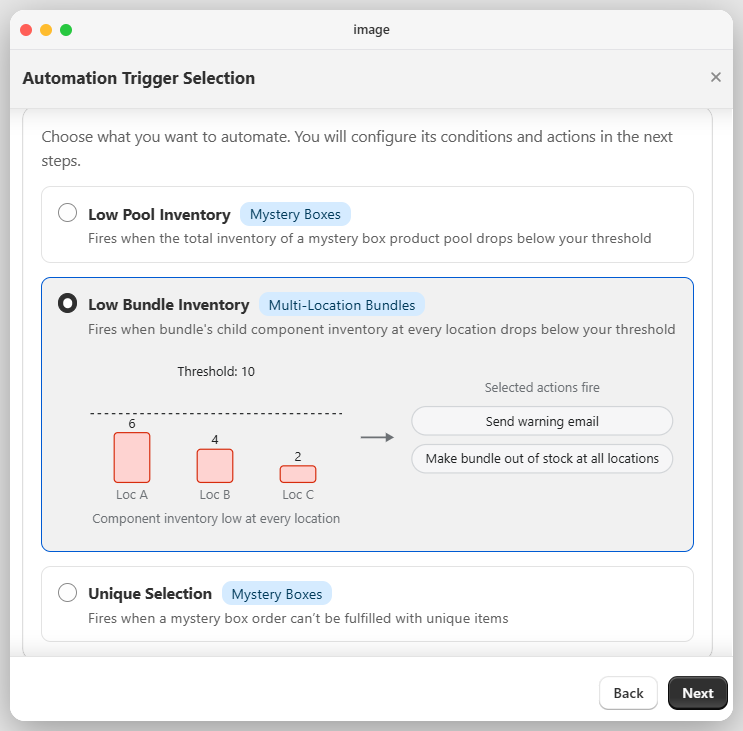
The Low Inventory Automation for Multi-Location Bundles is a way to set up multi location bundles in the app. Traditionally bundle and it's child item used to be part of the same location, but with advent of multi location fulfillment orders in shopify, it is entirely possible to have bundle in one location and child items in any other location.
How to Configure
To set up this automation:
- Open Profit Bundles & Mystery Boxes.
- Navigate to Settings → Automations.
- Click Create New Automation.
- Select Low Inventory Automation for Multi-Location Bundles
- Define your desired Low Inventory Threshold.
- Choose one or more automation actions, such as:
- Send Warning Email
- Make Parent Bundle Out of Stock
Once the automation is saved, the app will begin monitoring the inventory of your bundle components automatically.
You can enable either one or both actions based on your business requirements. Automatically marking the parent bundle as Out of Stock prevents customers from purchasing bundles that can no longer be fulfilled, helping reduce the risk of overselling.
How It Works
This automation does not monitor the inventory of the parent bundle product. Instead, it monitors the inventory of each individual child product included in the bundle at the time of order.
Since the inventory of the parent bundle itself is not used for this automation, you are free to set the parent bundle inventory to any value that fits your workflow (for example, 100, 1,000, or any other quantity).
The app checks the available inventory of every child product at all locations, finds the maximum inventory value and compares it against the Low Inventory Threshold you have configured.
As soon as any one of the child products reaches or falls below the defined threshold, the app automatically executes the automation actions you selected.
Example
If your Low Inventory Threshold is set to 5, and lets suppose your child items have following inventory
|
|
Location A | Location B | Location C |
| Child Item A | 3 | 11 | 13 |
| Child Item B | 0 | 2 | 5 |
Behavior
This automation behaves as follows:
- For Child Item A, even though the inventory is below threshold at Location A, the Max Inventory at Location is 13 so this wont trigger the automation action.
- For Child Item B, the inventory is below threshold at all Locations, the Max Inventory at Location is 5 so this will trigger the automation action.
- This works because incase of multi location bundles, shopify will allocate the fulfillment location based on where the child item is available, so incase of Child Item B, even if original order is placed at Location A, Shopify will add this item either at Location B or C based on your order routing rules.
- Once the threshold condition is met, all selected automation actions are executed automatically.
- So now even if the inventory of parent bundle is 36 currently, app will make it out of stock as one the child item is nearly out of stock at all the locations, so no more orders are possible.